DpdoPlayerEngine — DSD Audio Player
Overview
DpdoPlayerEngine is a command-line audio player optimized for DSD playback. It supports both native DSD output and DoP (DSD over PCM) transmission, compatible with a wide range of USB DACs and DSD decoders.
Specs at a Glance
| Spec | Value |
|---|---|
| Audio formats | DSD (DSF / DFF / DST / WSD) · SACD ISO · DTS / DTS-WAV · PCM (WAV / AIFF / FLAC) · ALAC / TTA / WavPack / APE · CUE |
| Transport | Native DSD output / DoP (DSD over PCM) / DSD→PCM decode playback |
| Output modes | standard / differential / BTL |
| Channel layout | stereo / multichannel pass-through / custom mapping |
| Stream mode | low-latency (-stream) |
| Platforms | Windows / Linux / macOS |
| Current version | 6.75.0 |
Basic Usage
DpdoPlayerEngine <audio_file> [options]
Supported formats: - DSD: DSF (.dsf) / DFF (.dff) / DST-compressed DSF/DFF (auto-decompressed on playback) / WSD (.wsd, Korg, since 6.70.0) / SACD ISO (.iso, with DST decompression) - DTS: .dts / DTS-WAV (core 2.0-5.1) - PCM: WAV / AIFF / AIFC / FLAC - Lossless-compressed: ALAC (.m4a / .mp4) / TTA (.tta) / WavPack (.wv) / APE (.ape) - Playlists: CUE (gapless) - Not supported yet: MP3 / AAC / OGG
The simplest playback:
# Play a single DSF file
	DpdoPlayerEngine track.dsf

	# Play a DFF file
	DpdoPlayerEngine track.dff
Device Configuration
-dev selects the audio output device:
# List available devices
	DpdoPlayerEngine track.dsf -dev list

	# Select by device ID
	DpdoPlayerEngine track.dsf -dev 1

	# Select by device name
	DpdoPlayerEngine track.dsf -dev "USB Audio DAC"
Example device list:
Available audio devices:
	  0: Default Output
	  1: USB Audio DAC (ALSA)
	  2: HDMI Audio Output
Channel Layout
-layout configures output channel mapping:
# Force stereo output
	DpdoPlayerEngine track.dsf -layout stereo

	# Force multichannel pass-through
	DpdoPlayerEngine track.dsf -layout multichannel

	# Custom mapping (left → output 1, right → output 2)
	DpdoPlayerEngine track.dsf -layout "1,2"
Layout Options
| Value | Description |
|---|---|
stereo | Standard stereo |
multichannel | Multichannel pass-through |
reverse | Swap left/right |
mono | Mono mixdown |
custom | Custom mapping (comma-separated channel indices) |
Playback Mode
-mode sets the output mode:
# Standard mode
	DpdoPlayerEngine track.dsf -mode standard

	# Differential output
	DpdoPlayerEngine track.dsf -mode differential

	# BTL bridged mode (Bridge-Tied Load)
	DpdoPlayerEngine track.dsf -mode btl
Mode Descriptions
| Mode | Description | Use Case |
|---|---|---|
standard | Standard single-ended output | general compatibility |
differential | Differential signal, inverted pair per channel | balanced DACs |
btl | BTL bridged load, inverted drive on positive/negative | high-power output |
DoP Mode (DSD over PCM)
-dop controls DSD-over-PCM behavior:
# Auto-select DoP or native DSD
	DpdoPlayerEngine track.dsf -dop auto

	# Force DoP mode
	DpdoPlayerEngine track.dsf -dop force

	# Force native DSD mode
	DpdoPlayerEngine track.dsf -dop native
Whether DoP really works is decided by device-side evidence: being able to open 176400 exclusively does not mean the endpoint can decode DoP — an onboard codec has no DSD path in hardware, so feeding it DoP just plays the markers as ordinary PCM (what you hear is hiss). On endpoints judged incapable, -dop force is refused and playback automatically switches to DSD→PCM; the GUI (DpdoPlayer) shows the verdict right in the device dropdown (⟨DoP 2x⟩ / ⟨DoP 1x⟩ / ⟨DoP unconfirmed⟩ / ⟨PCM only⟩), and a device whose verdict is unconfirmed can be flagged with one click using "mark as DSD decoder".
DoP Options
| Value | Description |
|---|---|
auto | Auto-detect device capability, choose the best transport |
force | Force DoP encapsulation (DSD embedded in 24-bit PCM frames) |
native | Force native DSD transport (requires device support) |
Tip: most modern USB DACs support native DSD. Try
nativefirst; switch toforceif you hear noise or silence.
Volume Control
-vol sets playback volume (percent):
# Set volume to 80%
	DpdoPlayerEngine track.dsf -vol 80

	# Maximum volume
	DpdoPlayerEngine track.dsf -vol 100

	# Quiet monitoring
	DpdoPlayerEngine track.dsf -vol 30
Volume range: 0–100, default depends on the device's initial setting.
Volume is applied on the device side (ALSA hardware mixer on Linux, endpoint volume on Windows) — the host never attenuates digitally, because a software multiply on a 1-bit DSD stream is lossy.
> Without -vol the device volume is left untouched; -vol 100 pulls the device volume to maximum.
DSD → PCM Decode Playback
-pcm mode lets DACs without native DSD support play DSD files: Pdm2Pcm decodes to PCM in real time during playback.
# Auto-rate decode playback (DSD/64 or DSD/32)
	DpdoPlayerEngine track.dsf -pcm

	# Explicit decode sample rate
	DpdoPlayerEngine track.dsf -pcm 352800

	# 16-bit output
	DpdoPlayerEngine track.dsf -pcm -pcm-bits 16
-pcm [rate]— enable DSD→PCM decode playback; rate 0 (omitted) = auto (DSD/64 or DSD/32)-pcm-bits <16|24|32>— output bit depth, default 24-bit; built-in noise shaping pushes quantization noise to high frequencies, markedly improving perceived quality
Tip: 24-bit with noise shaping is the sweet spot between quality and compatibility; 16-bit suits legacy devices, 32-bit suits downstream processing chains.
Stream Mode
-stream enables low-latency streaming:
# Stream-mode playback
	DpdoPlayerEngine track.dsf -stream
Stream Mode Features
- Lower latency — reduced audio buffer
- Real-time playback — ideal for live monitoring with pipe input
- Auto-adaptation — buffer adjusts dynamically to system performance
Real-Time Convert-and-Play with DpdoEngine Pipe
# Real-time PCM → DSD conversion played through DpdoPlayerEngine
	DpdoEngine -i input.flac output.dsf -osr 64 -pipe | DpdoPlayerEngine - -vol 80

	# Real scenario: live monitoring of a recording
	DpdoEngine -record -format dsf recording.dsf -pipe | DpdoPlayerEngine - -stream
Here - means reading audio data from stdin.
Full Playback Examples
# High-spec playback configuration
	DpdoPlayerEngine sacd_track.dsf \
	  -dev "USB DAC" \
	  -layout stereo \
	  -mode differential \
	  -dop native \
	  -vol 85

	# Multichannel native DSD playback
	DpdoPlayerEngine multichannel.dsf \
	  -dev 1 \
	  -layout multichannel \
	  -mode standard \
	  -dop native

	# Low-latency stream-mode playback
	DpdoPlayerEngine live_recording.dsf \
	  -stream \
	  -dev 0 \
	  -vol 70
Troubleshooting
No Sound Output
- Confirm the DAC is connected and recognized by the system
- Use
-dev listand select the correct device - Try switching DoP mode:
-dop auto→-dop force(on an endpoint without a DSD path,forceis automatically redirected to DSD→PCM decoding) - Check the volume setting:
-vol 100
Noise or Pops During Playback
- If noise occurs in native DSD mode, try DoP:
-dop force; but never use DoP on endpoints without a DSD path (onboard sound cards only give hiss) — the player blocks it and switches to DSD→PCM - Check USB cable quality and connection stability
- Try a lower DSD spec (e.g. DSD128 source instead of DSD256)
Device Not Listed
- Confirm the DAC driver is installed on the OS
- On Linux, make sure ALSA is configured correctly
- Check the USB connection
GUI edition
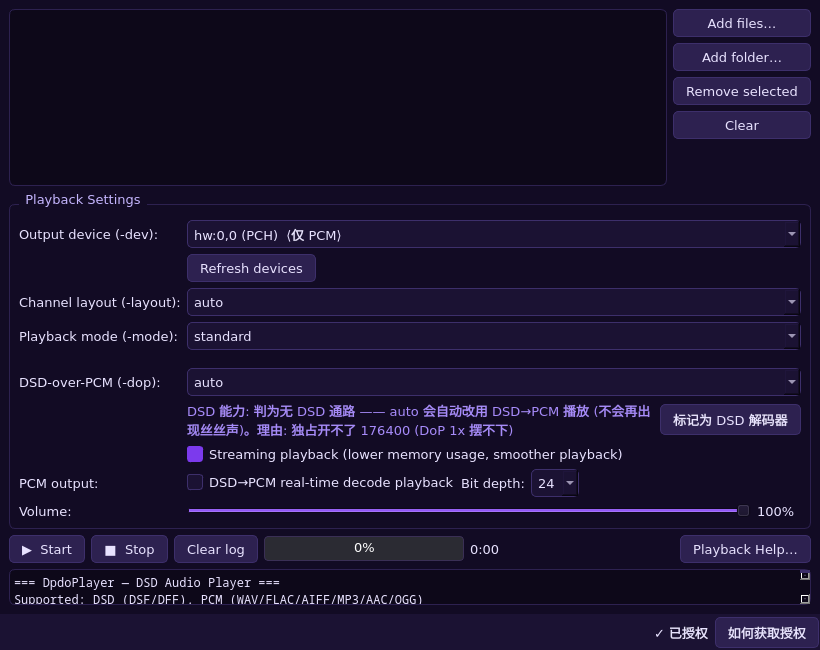
Above: the player GUI (DpdoPlayer) — pick files, choose the output device, watch progress. The packer and the audio toolkit have their own GUIs on their own pages.
Why choose DpdoPlayer
Other players play DSD too; DpdoPlayer is specific about these things (all verifiable behaviour, not marketing):
- Native DSD output with a real fallback: native/DoP first; a DAC without DSD support still plays DSD through real-time PDM2PCM decoding, and a rig that needs mixing switches to the decode path automatically and says so in the log.
- Multiple DACs are first-class: one DAC per channel (differential/balanced, BTL) or one multi-channel DAC; the device↔channel mapping is configurable -- however the rig is wired, that is how you configure it.
- Configurable channel rigs that never lie: mix matrix + mix gain (presets direct / bs775 / all-channel-stereo, or a custom
*.json; the GUI and the CLI share one rig). An invalid rig (unknown channel name, gain out of range, mapping length not matching the device) refuses to play instead of quietly switching to some other behaviour. - Know about clipping before you listen: a measured scan runs the whole track through the current rig and reports the peak per channel, whether it clips, and the mix gain that lands exactly at 0 dBFS; a separate worst-case gain check answers the matrix-only question instantly.
- Bit-perfect routing: per-channel routing leaves every sample untouched, with no default limiter, AGC or loudness normalisation; only actual mixing changes level, with static, reproducible coefficients.
- Format coverage: DSD (DSF / DFF / WSD / DSD-raw), SACD ISO including DST decompression, DTS / DTS-WAV, PCM (WAV / AIFF / FLAC), CUE sheets (gapless).
- Volume goes to the device endpoint, never to the samples (a software multiply on 1-bit DSD is lossy); ASIO / WASAPI exclusive on Windows, ALSA on Linux, same engine on both.