DpdoPackSACD — SACD ISO Authoring Tool
Overview
DpdoPackSACD packs multiple DSF/DFF audio files into a standard SACD ISO image. The resulting ISO works with players, virtual drives and disc burning — suitable for SACD archiving and distribution.
Specs at a Glance
| Spec | Value |
|---|---|
| Input formats | DSF / DFF |
| Output formats | SACD ISO image; Dpdo DSD Disc (DVD-R/RW) |
| Metadata | album / artist / cover / genre / year / label / composer / conductor / barcode / ISRC |
| CUE import | Yes |
| Standard | SACD Orange Book |
| Platforms | Windows / Linux / macOS |
| Current version | 6.75.0 |
Basic Usage
DpdoPackSACD [OPTIONS] <files...>
The simplest authoring:
# Pack all DSF files in the current directory into a SACD ISO
	DpdoPackSACD *.dsf
Metadata Options
DpdoPackSACD supports rich metadata that displays directly on SACD players:
| Parameter | Description | Example |
|---|---|---|
--album "TITLE" | Album title | --album "Symphony No. 9" |
--artist "NAME" | Artist | --artist "Ludwig van Beethoven" |
--cover FILE | Cover art | --cover cover.jpg |
--genre "GENRE" | Genre | --genre "Classical" |
--year YYYY | Year | --year 2024 |
--label "NAME" | Record label | --label "Deutsche Grammophon" |
--composer "NAME" | Composer | --composer "Beethoven" |
--conductor "NAME" | Conductor | --conductor "Herbert von Karajan" |
--barcode "CODE" | EAN/UPC barcode | --barcode "028947757823" |
-isrc "CODE" | ISRC code (per-file) | -isrc "DEF059003211" |
--catalog "ID" | Catalog number | --catalog "477 523-4" |
Full example:
DpdoPackSACD \
	  --album "The Wall" \
	  --artist "Pink Floyd" \
	  --genre "Progressive Rock" \
	  --year 1979 \
	  --label "Harvest / EMI" \
	  --cover cover.jpg \
	  01_in_the_flesh.dsf \
	  02_the_thin_ice.dsf \
	  ...
CUE Import
DpdoPackSACD imports CUE track sheets to read track info and timestamps:
DpdoPackSACD --album "My Album" --artist "Artist" --cue tracks.cue *.dsf
Example CUE format:
REM GENRE "Classical"
	REM DATE 2024
	PERFORMER "Artist Name"
	TITLE "Album Title"
	FILE "track1.dsf" DSD
	  TRACK 01 AUDIO
	    TITLE "First Movement"
	    PERFORMER "Artist Name"
	    INDEX 01 00:00:00
	FILE "track2.dsf" DSD
	  TRACK 02 AUDIO
	    TITLE "Second Movement"
	    PERFORMER "Artist Name"
	    INDEX 01 00:00:00
Cover Art
Supported image formats: JPEG, PNG.
# Front cover
	DpdoPackSACD --album "Album" --artist "Artist" --cover front.jpg *.dsf

	# Back cover
	DpdoPackSACD --album "Album" --artist "Artist" --cover back.png *.dsf
Recommended cover size: at least 600×600 pixels, ideally 1:1 square.
Dpdo DSD Disc Support
DpdoPackSACD can create a Dpdo DSD Disc — a DSD audio disc format based on DVD-R/RW media:
# Pack with DVD-R parameters
	DpdoPackSACD --album "DSD Collection" --dsd-disc *.dsf
DSD Disc Advantages
- Uses standard DVD-R/RW discs (4.7 GB / 8.5 GB dual-layer)
- Plays directly on DSD Disc-capable devices
- Supports higher DSD specs than standard SACD (DSD128 / DSD256)
- A single DVD-R holds dozens of high-sample-rate DSD albums
Parameter Reference
| Parameter | Description | Default |
|---|---|---|
--album= | Album title | — |
--artist= | Artist name | — |
--cover= | Cover art path | — |
--genre= | Genre | — |
--year= | Year | — |
--label= | Label | — |
--composer= | Composer | — |
--conductor= | Conductor | — |
--barcode= | Barcode | — |
-isrc | ISRC code | — |
--catalog= | Catalog number | — |
--cue= | CUE track sheet | — |
--dsd-disc | Dpdo DSD Disc mode | OFF |
-o | Output ISO path | auto-generated |
--track-title=N:TEXT | Short album title | — |
--pause=N | Insert silence between tracks | OFF |
-twochannel | Force 2-channel output | OFF |
-multichannel | Multichannel support | OFF |
Output File
The default output filename is album_title.iso (derived from --album=). Override with -o:
DpdoPackSACD --album "My Album" -o my_sacd_2024.iso *.dsf
Recommended Workflow
Standard SACD Authoring Flow
- Convert PCM to DSF with DpdoEngine
- Prepare cover art and metadata
- Confirm track file naming in order (e.g.
01_track.dsf,02_track.dsf) - Run DpdoPackSACD
- Verify the output ISO
Full Example: Source Files to SACD ISO
# Step 1: convert PCM to DSF
	DpdoEngine -i 01.wav 01.dsf -osr 128 -iir 7 --artist "Artist" --album "Album" --track-title=N:TEXT "Track 1"
	DpdoEngine -i 02.wav 02.dsf -osr 128 -iir 7 --artist "Artist" --album "Album" --track-title=N:TEXT "Track 2"

	# Step 2: author the SACD ISO
	DpdoPackSACD \
	  --album "Album" \
	  --artist "Artist" \
	  --genre "Genre" \
	  --year 2024 \
	  --cover cover.jpg \
	  -o "Album.sacd.iso" \
	  01.dsf 02.dsf
Batch Authoring Multiple Albums
#!/bin/bash
	# Loop over album directories, authoring each automatically
	for dir in /music/dsd/*/; do
	  album=$(basename "$dir")
	  DpdoPackSACD \
	    --album "$album" \
	    --artist "$ARTIST" \
	    --cover "$dir/cover.jpg" \
	    -o "/isos/${album}.iso" \
	    "$dir"/*.dsf
	done
GUI edition
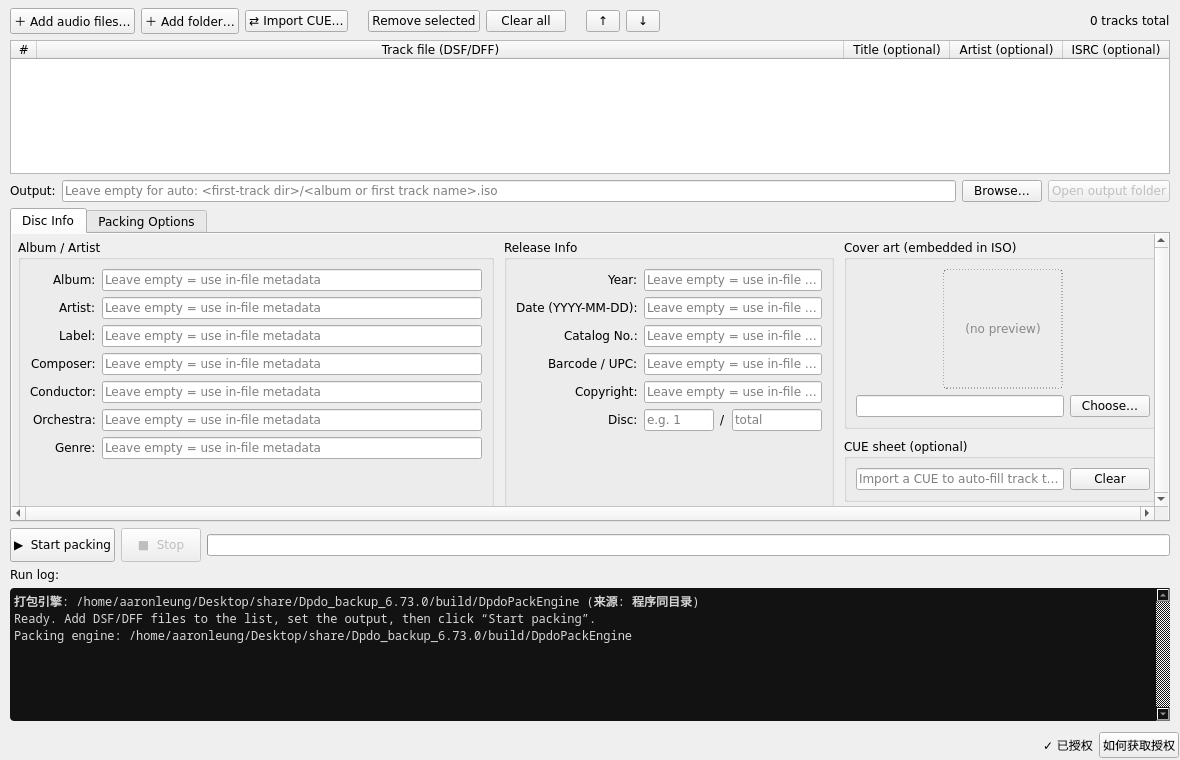
Above: the SACD ISO authoring GUI (DpdoPackSACD) — album metadata, cover, packing log. The CLI edition is DpdoPackEngine.