DpdoEngine — High-Precision PCM to DSD Conversion Engine
Overview
DpdoEngine is the core of the Dpdo product suite. It converts PCM audio (FLAC, WAV, AIFF, etc.) to DSD formats (DSF, DFF, DST, WSD) using full 64-bit double-precision floating-point arithmetic, configurable high-order IIR/FIR noise-shaping filters, and a rich DSP toolkit — offering multi-tier conversion quality from consumer to audiophile grade for professional audio engineers and enthusiasts.
Specs at a Glance
| Spec | Value |
|---|---|
| Input formats | WAV / FLAC / AIFF / ALAC and other PCM |
| Output formats | DSF / DFF / DST / WSD |
| Precision | 64-bit double-precision floating point |
| Noise shaping | 3–15 order IIR (9 default); FIR (4096 taps default) |
| Oversampling | 64x–4096x (64x / DSD64 default) |
| Compression | Native DST lossless (30–50% size reduction) |
| GPU acceleration | OpenCL 1.2+ |
| Platforms | Windows / Linux / macOS |
| Current version | 6.75.0 |
Basic Usage
DpdoEngine -i INFILE OUTFILE [OPTIONS]
Required arguments:
- -i INFILE — input PCM file (FLAC / WAV / AIFF, etc.)
- OUTFILE — output file path (format auto-detected from extension: .dsf / .dff / .dst / .wsd)
Examples:
# Basic conversion: WAV → DSF, 64x oversampling
	DpdoEngine -i input.wav output.dsf --oversampling 64

	# FLAC → DFF, 11th-order IIR noise shaping
	DpdoEngine -i input.flac output.dff --oversampling 128 --order 11

	# Full parameters: OpenCL acceleration + metadata + report
	DpdoEngine -i input.flac output.dsf --oversampling 256 --order 7 --opencl --report --artist "Dpdo" --album "Demo"

	# WAV → WSD (Korg format), DSD64
	DpdoEngine -i input.wav output.wsd --oversampling 64
Oversampling
Controlled by --oversampling or --oversampling:
| Value | Format | Typical Bandwidth |
|---|---|---|
| 64 | DSD64 | ~30 kHz |
| 128 | DSD128 | ~60 kHz |
| 256 | DSD256 | ~120 kHz |
| 512 | DSD512 | ~240 kHz |
| 1024 | DSD1024 | ~480 kHz |
| 2048 | DSD2048 | Very high bandwidth |
| 4096 | DSD4096 | Extreme spec |
Higher oversampling gives wider frequency response and lower in-band noise, with linearly increasing compute requirements.
Noise Shaping Options
IIR Noise Shaping
The --order parameter sets the IIR noise shaper order. Supported orders: 3, 5, 7, 9, 11.
# 15th-order IIR (highest spec)
	DpdoEngine -i input.wav output.dsf --oversampling 256 --order 15
Higher-order IIR provides a steeper noise-shaping curve and a larger in-band dynamic range, but demands more numerical stability. Order 15 is an exclusive top spec of DpdoEngine, pushing audible-band noise down to -150 dB.
Sub-options:
- --pole 8.5 — pole placement, affects the noise transfer function shape
- --zero — zero placement, further optimizes out-of-band noise distribution
- --mash — MASH structure noise shaping (multi-stage noise shaping)
- --cifb — CIFB (Chain of Integrators with FeedBack) structure
- --poly — polynomial noise shaper
FIR Filters
`` enables FIR filter mode:
# Kaiser-windowed FIR with auto-computed optimal taps
	DpdoEngine -i input.wav output.dsf --oversampling 64

	# Specify taps and window type
	DpdoEngine -i input.wav output.dsf --oversampling 64  --taps 4096 --window-type kaiser
FIR options:
- --taps <N> — number of taps (auto-computed by default, 4096 recommended minimum)
- --beta <V> / --beta <V> — Kaiser window parameter
- --window-type <type> — window type: kaiser, blackman, flattop, bartlett, hamming, hanning, remez
GPU Acceleration
DpdoEngine -i input.wav output.dsf --oversampling 256 --opencl
--opencl enables OpenCL GPU acceleration, greatly reducing processing time for high-order oversampling. Requires a GPU with OpenCL 1.2+ support. GPU acceleration is especially effective for FIR filtering and high-order IIR.
Advanced Signal Processing
Mastering Presets
--mastering-preset loads a one-click DSP chain tuned for a music genre:
DpdoEngine -i input.wav output.dsf --oversampling 256 --mastering-preset classical
	DpdoEngine -i input.wav output.dsf --oversampling 256 --mastering-preset pop
	DpdoEngine -i input.wav output.dsf --oversampling 256 --mastering-preset jazz
Equalizer
Multi-band parametric EQ applied to the PCM signal before conversion:
DpdoEngine -i input.wav output.dsf --oversampling 128 --equalizer "80:0.5:3,1000:1.0:1,8000:-0.5:2"
Format: <frequency(Hz)>:<gain(dB)>:<Q>, bands separated by commas.
Harmonic Saturation
Adds controlled even/odd harmonics during conversion:
# Soft-clipping saturation
	DpdoEngine -i input.wav output.dsf --oversampling 128 --harmonics tanh,0.5

	# Tape-emulation saturation
	DpdoEngine -i input.wav output.dsf --oversampling 128 --harmonics tape,0.3
Supported types: tanh, poly, softclip, fullwave, tape.
Psychoacoustic Noise Shaping
--psy uses auditory masking to optimize the noise-shaping curve, distributing quantization noise into less sensitive frequency regions — good subjective sound even at lower oversampling rates.
Dynamic Range Processing
--lufs -16        # loudness normalize to -16 LUFS
	--rg              # ReplayGain normalization
	--lal             # look-ahead limiter to prevent clipping
	--apo             # anti-clipping filter
	--adaptive        # adaptive parameter adjustment
Metadata Support
Embed metadata into the output file during conversion:
DpdoEngine -i input.flac output.dsf --oversampling 64 \
	  --artist "Artist Name" \
	  --title "Track Title" \
	  --album "Album Name" \
	  --genre "Classical" \
	  --year 2024
Reverse Conversion (DSD → PCM)
DpdoEngine can also convert DSD back to PCM:
DpdoEngine -i input.dsf output.wav --reverse
The same 64-bit double-precision DSP engine is used in both directions, ensuring the same high precision in reverse conversion.
Analysis Reports
# Generate a PDF analysis report
	DpdoEngine -i input.wav output.dsf --oversampling 64 -pdfrp

	# Spectrogram generation
	DpdoEngine -i input.wav output.dsf --oversampling 64 --spectrogram

	# Noise analysis
	DpdoEngine -i input.wav output.dsf --oversampling 64 --noise-profiling
-pdfrp produces a comprehensive PDF report with conversion parameters, frequency response curves, noise-shaping characteristics and spectral analysis.
Output Formats
| Extension | Format | Description |
|---|---|---|
.dsf | DSF | DSD Stream File, the most common DSD format |
.dff | DFF | DSD Interchange File Format, broadcast standard |
.dst | DST | Direct Stream Transfer, DSD with lossless compression |
.wsd | WSD | Korg Wideband Single-bit Data, Korg recorder / AudioGate ecosystem format |
More Documentation
- Full parameter reference — every command-line parameter in detail
- WSD Format — the Korg WSD output format in detail
- DSP Toolkit — EQ, compressor, harmonic generator and other DSP modules
- Batch & Recording — batch mode, native DSD recording, pipe output
DSD recording
DSD recording is supported: capture in real time from an ADC straight to DSD (DSF), or convert existing PCM material in batch — see “Batch conversion & recording”.
GUI edition
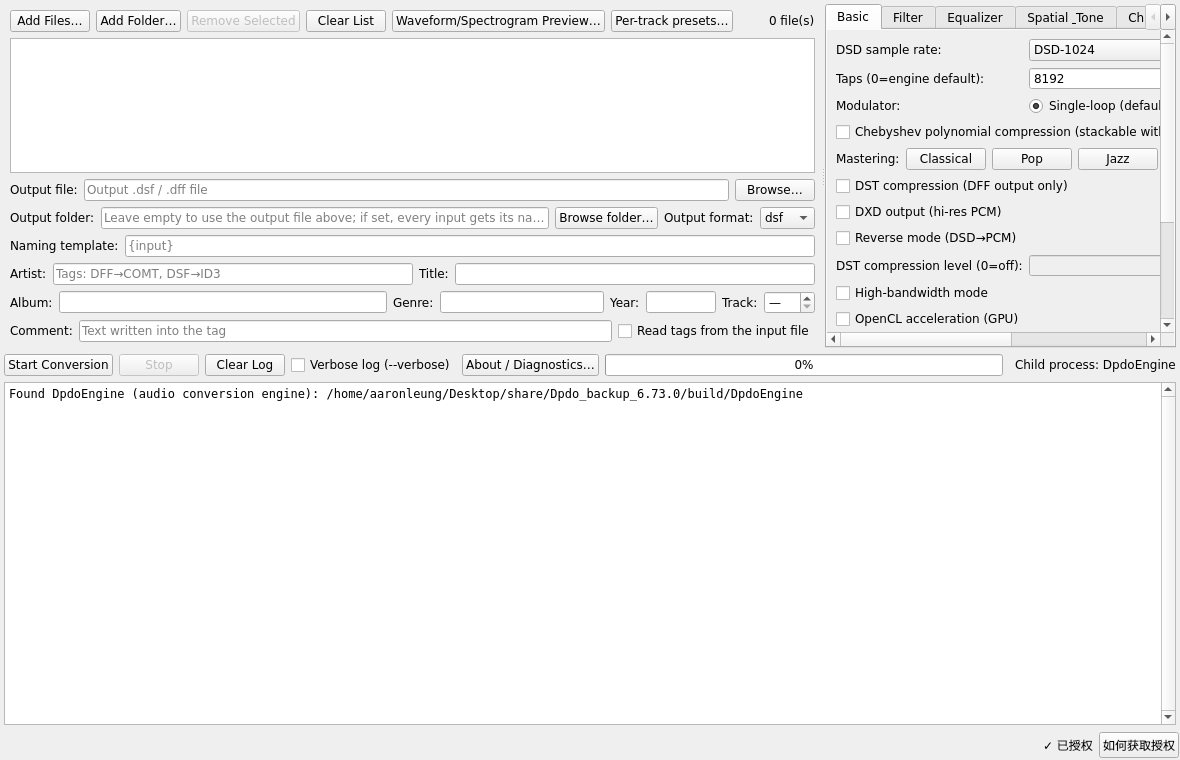
Above: the audio toolkit GUI (DpdoAudioTools) — conversion options, DSD rate, modulator, DST compression, OpenCL. The CLI edition is DpdoEngine.